


When working with multiple athletes or patients, the challenge is not only to collect data. You also need to keep the session flowing, organize each participant, maintain a clear overview of the group, and access results without wasting time. That is exactly what Group Mode in the Kinvent App is designed for.
In this article, discover how Kinvent makes group testing and training faster, smoother, and more structured for coaches, strength and conditioning professionals, physical therapists, and clinics working with multiple profiles in the same session.
CONTENTS
1- Why Group Testing and Training Can Be Time-Consuming in Practice
2- Group Testing and Training with Kinvent: A Faster and More Structured Workflow
3- How to Analyze and Use Group Mode Data
4- FAQ: Group Testing and Training with Kinvent
1- Why Group Testing and Training Can Be Time-Consuming in Practice
In sports performance and rehabilitation, professionals often need to test several athletes or patients in a row. This can happen during:
- team testing sessions
- screening days
- return-to-sport assessments
- group training sessions
- clinic workflows with back-to-back patients
But in practice, managing these sessions manually can quickly become inefficient.
Professionals often need to:
- switch between individual profiles
- launch tests one by one
- organize the order of participants
- configure different tests or exercises for specific participants
- keep the session moving
- avoid data mix-ups
- retrieve results after each test
When several people are involved, these small actions can create friction, slow down the session, and increase the risk of mistakes.
For coaches and strength and conditioning professionals, this can disrupt the rhythm of a training session. For physical therapists and clinics, it can be harder to manage multiple patients efficiently while maintaining clear records of each person’s results.
The key challenge is simple: testing multiple people should not feel like repeating the same individual workflow over and over again.
This is why a dedicated group testing and training workflow is essential. It helps professionals save time, stay organized, and maintain a structured view of the entire group.
2- Group Testing and Training with Kinvent: A Faster and More Structured Workflow
🆕 New: An improved Group Mode experience
With the latest updates, Group Mode in the Kinvent App becomes even more intuitive, flexible, and efficient to use on a daily basis.
The goal is simple: reduce friction and make group sessions easier to manage.
Key improvements include:
- smoother navigation
- clearer session organization
- faster participant search
- improved readability of results
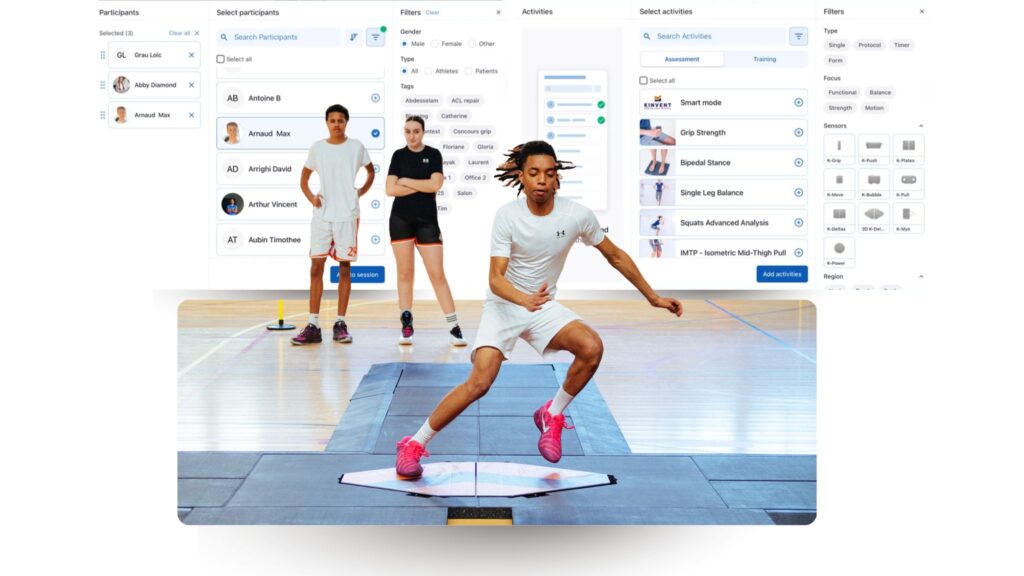
Another major improvement is the ability to run group testing sessions without creating athlete or patient profiles in advance. This makes setup even faster for one-off testing sessions, team screenings, or situations where quick access is essential.
These updates allow coaches and clinicians to start sessions quickly, adapt on the go, and keep full control without interrupting the workflow.
👉 Learn more about the Group Mode here
What changes in practice?
With Group Mode, you move from an individual workflow to a fully optimized group workflow.
Instead of:
- launching tests one by one
- switching profiles manually
- managing results separately
You can now:
- run sessions seamlessly
- keep the group engaged
- reduce repetitive actions
- focus more on coaching and analysis
This makes sessions faster, more fluid, and easier to manage in real-world conditions.
More than testing: group training and monitoring
Group Mode is not limited to testing.
It also allows professionals to run training sessions with multiple athletes, making it a versatile tool for:
- performance training
- group conditioning sessions
- real-time monitoring
- structured team workflows
This creates a unified approach where you can test, train, and track performance within the same session.
You can also activate Smart Mode alongside Group Mode to make testing and training even faster and more seamless.
👉 Learn more about Smart Mode here.
Who is it for?
Group Mode in the Kinvent App is designed for:
- strength & conditioning coaches
- sports teams and academies
- physical therapists
- clinics managing multiple patients
- performance professionals working with groups
👉 Discover Group Mode in the Kinvent App
3- How to Analyze and Use Group Mode Data
The value of Group Mode does not stop when the session ends. It becomes even more powerful when you start analyzing and using the data collected across multiple participants.
Clear group overview
One of the main advantages of Group Mode is the ability to quickly get a clear overview of the entire group.
Instead of reviewing results individually, you can:
- compare athletes or patients at a glance
- identify performance differences
- spot trends within the group
- detect outliers or specific profiles
This makes analysis faster and more actionable in daily practice.
Comparing performance within the group
Group Mode makes it easier to understand how individuals perform relative to others.
You can quickly identify:
- top performers
- athletes or patients who need more attention
- differences between positions or profiles
- potential asymmetries or deficits
This is particularly useful in team environments where benchmarking is key.
Tracking progress over time
Group Mode also allows you to follow both individual and group progression.
You can:
- monitor improvements over multiple sessions
- track rehabilitation progress
- evaluate the impact of training programs
- compare performance across different time points
This helps build a more structured and long-term view of performance.
From organization to decision-making
Group Mode is not just about saving time during the session.
It is about improving the entire workflow, from organization to analysis.
It allows you to:
- structure sessions more efficiently
- analyze data more easily
- make faster and more informed decisions
- improve overall performance tracking
With Kinvent, Group Mode becomes a complete system to organize, analyze, and monitor multiple athletes or patients with clarity and efficiency.
4- FAQ: Group Testing and Training with Kinvent
What is group testing?
Group testing refers to the ability to assess multiple athletes or patients within the same session, instead of testing each individual separately. It helps streamline workflows and manage group sessions more efficiently.
Why is group testing and training important in sports and rehabilitation?
Group testing and training allow professionals to save time, maintain session flow, and compare results across multiple participants. It is especially useful for:
- team testing sessions
- performance screenings
- group rehabilitation
- training environments
How can you test multiple athletes efficiently?
To test multiple athletes efficiently, you need a structured workflow that minimizes manual actions. Tools like Group Mode in the Kinvent App allow you to run sessions smoothly, organize participants, and collect data without interruptions.
How do you analyze group testing and training results?
Group testing and training results should be analyzed by comparing participants, identifying performance differences, and tracking progress over time.
Key elements include:
- group comparison
- individual performance tracking
- trend analysis
- data export for reporting


