


In clinics and on the field, time is limited. Physical therapists and coaches often need to perform multiple tests to complete a functional assessment.
But in practice, the process can quickly become time-consuming: setting up equipment, launching tests one by one, switching protocols, explaining each exercise, repositioning sensors, exporting results.
The result is repeated manipulations, potential errors, and less time available to analyze the data.
What if a single session could capture all your tests automatically?
In this article, discover how Smart Mode in the Kinvent App helps structure faster, more efficient functional assessments.
CONTENTS
1- Why Functional Assessments Often Take Too Long
2- Smart Mode in the Kinvent App: Intelligent and Automatic Assessment
3- Standardized Assessments and Instant Data Insights
4- FAQ
5- References
1- Why Functional Assessments Often Take Too Long
A functional assessment typically includes a battery of tests to evaluate strength, stability, mobility, and asymmetries.
For clinicians and performance professionals, this usually means:
- configuring each test individually
- restarting recordings multiple times
- switching protocols between exercises
- repositioning sensors
- organizing data manually
While necessary, these steps can slow down the workflow.
In real practice, this leads to several challenges:
- less time to analyze the data
- less fluid testing sessions
- increased technical manipulation
The goal becomes clear: perform a complete functional assessment in less time while maintaining reliable and structured data.
This is exactly what Smart Mode in the Kinvent App enables.
2- Smart Mode in the Kinvent App: Intelligent and Automatic Assessment
This is a feature in the Kinvent App that automates movement detection and recording during an evaluation session.
Instead of launching each test individually, you can start a session and perform multiple exercises continuously.
The system automatically detects:
- jumps
- foot contacts
- dynamic exercises
All movements are instantly recorded in the patient’s profile.
💡 Watch this short tutorial to see how Smart Mode works with K-Deltas force plates to perform multiple jump assessments in one seamless session.
Learn how this mode automatically detects and records different jump tests, such as CMJ, Squat Jump, Drop Jump, Single-Leg Jumps, and Pogo Jumps, while measuring key metrics like jump height, contact time, RSI, power, and asymmetries.
This workflow allows you to capture and analyze multiple jump tests in a single recording, making performance assessments faster and more efficient.
Zero setup, one continuous session
With Smart Mode:
- sessions start instantly
- movements are detected automatically
- results are recorded in real time
This allows practitioners to perform multiple functional tests within a single recording.
Benefits include:
- fewer manipulations
- faster assessments
- smoother evaluation sessions
All results are automatically stored in the patient’s history.
💡 Learn how to use Smart Mode here
New Feature: Multiple Single-Leg Jumps in Smart Mode
Smart Mode now integrates the Multiple Single-Leg Jumps protocol on Kinvent force plates:
This protocol can now be executed directly within a session.
This enables:
- comprehensive single-leg analysis
- simplified left/right comparison
- more precise asymmetry detection
- full force plate integration
3- Standardized Assessments and Instant Data Insights
Smart Mode does more than speed up testing. It also improves data structure and usability.
Centralized data collection
Each test is automatically recorded within a logical sequence.
Practitioners can immediately access:
- completed tests
- key metrics
- charts and graphs
- a full session summary
Data exports are also available:
- PDF report ready to share
- CSV raw data export (Excellence license)
This provides a clear and structured evaluation history.
Intelligent repetition classification
Smart Mode automatically recognizes different types of movements and contractions.
After the session, practitioners can:
- assign repetitions to specific tests
- classify exercises precisely
- organize data according to their clinical protocol
This ensures full control over how assessments are structured.
Enhanced analysis with K-Apture
Smart Mode can also be combined with K-Apture, Kinvent’s motion analysis feature.
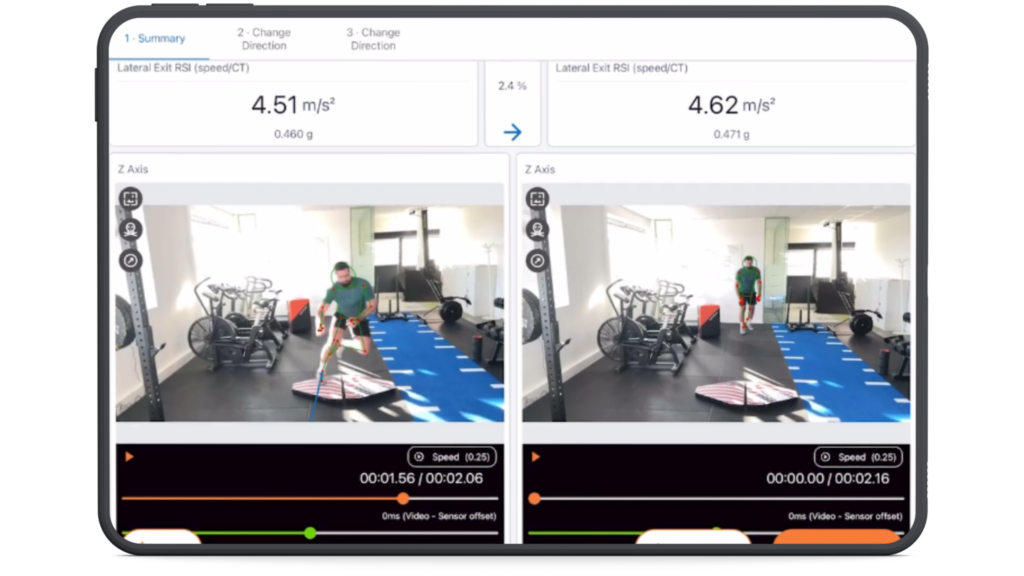
This allows practitioners to:
- combine force measurements with video analysis
- synchronize video with force data
- visualize force vectors
- analyze joint angles
This integration provides a deeper understanding of movement strategies.
💡 Discover how to use K-Apture on 3D Deltas
4- FAQ
What is Smart Mode in the Kinvent App?
Smart Mode is a feature in the Kinvent App that automatically records and detects movements during an evaluation session. Instead of launching each test individually, practitioners can perform multiple exercises in a single session while the system detects and records them automatically.
This allows clinicians to perform faster functional assessments while keeping all results organized in the patient’s profile.
What tests can be performed with Smart Mode?
Smart Mode allows practitioners to perform multiple exercises within one recording session. The system automatically detects movements and logs repetitions.
It can be used with protocols such as:
- jump tests
- dynamic exercises
- the Multiple Single-Leg Jumps protocol on Kinvent force plates
Repetitions can then be assigned to specific tests after the session.
What license is required to use Smart Mode?
Smart Mode requires at least a Premium license.
- Premium: Smart Mode with one sensor
- Excellence: Smart Mode with up to five sensors simultaneously and CSV data export
These licenses enable full use of automated testing and data analysis features.


